
What Is Digital Asset Management? A Complete Guide for Product Teams
What is DAM? Digital Asset Management (DAM) is the systematic approach to organizing, storing, and distributing digital files. It does more than simply hold files in a specific folder structure though; it acts as a centralised “single source of truth” for everything that makes your brand visual. Ensuring that the right people have the right visual assets at the right time.
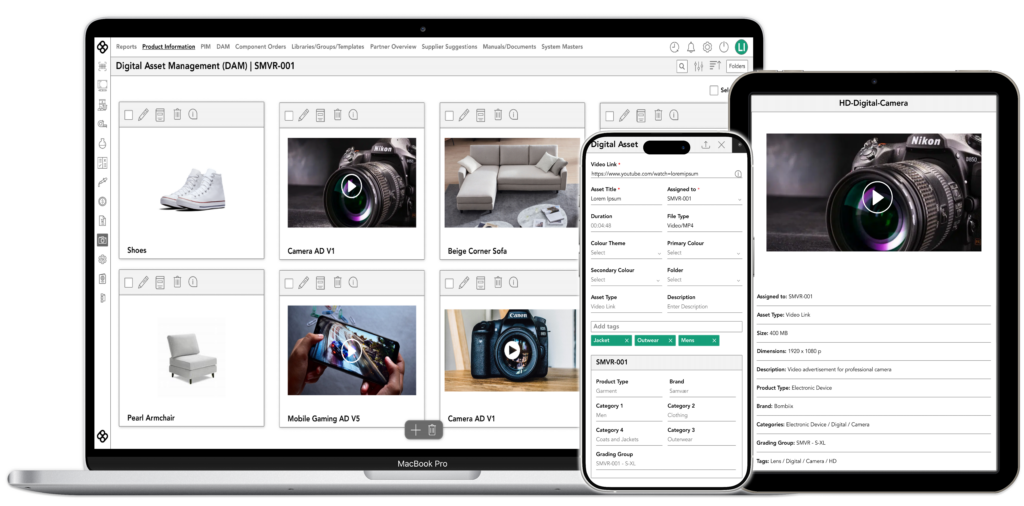
Understanding digital asset management fundamentals
DAM asset management software acts as your fully searchable library for digital imagery, videos, UI components and more. It is designed to make things easy to find, with all files being organised in a meticulous and logical way.
With the rise of digital-first product creation, physical prototypes are becoming a thing of the past. This places much more emphasis on the need for digital assets to be easy to find and organise.
Core components of a DAM system
- Central Repository: The “Single Source of Truth”
- Metadata Management: The “Digital DNA”
- Search Functionality: The “Google” for Your Brand
- Access Controls: The “Gatekeeper”
How DAM differs from cloud storage
It’s important to note that cloud storage solutions such as Google Drive and Dropbox are not the same as a DAM management platform. Cloud storage is basic whereas DAM platforms are intelligent.
Cloud storage systems rely heavily on folders and file paths. This can make finding the correct file difficult, if you don’t know what the file path is. A DAM does not rely on file paths or folders, it understands what a file is and how it should be used. All you need to do is use the search functionality and you’ll have the right file in seconds.
DAM systems allow for simple image manipulation within the software too. If you want to crop an image, you can do that within the DAM and generate it from the original high res asset. This is something that is not possible with cloud storage. To crop an image you will need to download it, edit the image in a separate software, and upload the new cropped image.
Cloud storage does not provide any contextual information for a digital asset. All you get is the file name. Digital Asset Management platforms enrich files with extra contextual information such as usage rights, expiration dates, and more.
Why product teams struggle without proper asset management
Without proper asset management, product teams spend more time navigating a digital labyrinth than they do creating products. Creativity and mental bandwidth is wasted on trying to find the right files, instead of being used to develop a new product.
There are some key issues that occur when you don’t have proper asset management.
- Rabbit hole searches: It’s not easy to find a file. You have to dig through files to find it.
- Version uncertainty: Is the file you’re using actually the latest version? You can’t be sure.
- Broken branding: Different image styles lead to an inconsistent and unpolished brand.
- Collaboration breakdown: Only one person has access to the right files. If they are in a meeting or on holiday, workflow grinds to a halt.
All of these issues can be easily resolved by using a DAM instead of relying on cloud storage.
Essential features every DAM system should have
For a DAM to truly make your product team’s life easier, it must include the following essential features:
Metadata tagging
Rather than having to waste precious time searching through a folder of images to find the right one, with the help of metadata tagging you can simply search for related keywords and the DAM will find the right image in seconds.
Version control
The DAM ensures that every image within the platform is the latest available version. If someone updates a file 5 minutes before you use it, you will be using the master version without having to worry about whether it’s up to date. Easy version rollback is also available on most DAM platforms.
User permissions
Each user has their own unique level of access for the platform. This extends to external agencies that can be restricted to only uploading their work and viewing the relevant branding guidelines within the platform. Preventing them from accidentally deleting files or editing existing assets that you didn’t want them to touch.
Advanced search
No one has to worry about remembering specific file names with advanced search. This is because AI scans all assets that are added and adds tags to each one. Instead of trying to find a specific file with a snowtopped mountain by sifting through image files, you can simply search for the term “snow+mountain” and easily find the right file in seconds.
Integration options
A DAM should not be used as a siloed digital asset library. It should be capable of connecting with other systems such as a PLM or PIM seamlessly, to ensure that changes in one system do not disrupt the product team’s workflow.
Types of digital assets in product development
There are a number of different digital assets in product development that need to be treated differently from one another. A high resolution 3D model of a product cannot be treated in the same way as a PDF. It is important to categorise your assets effectively, to ensure that your DAM is fully functional.
Design files
These are often Figma files, CAD drawings and Adobe design files such as Photoshop and Illustrator. They need robust versioning and tight access controls as they are usually the “source of truth” for everything else. A DAM that integrates with design tools can help designers to do everything from one workspace without needing to interrupt their workflow.
Product images
Images of products that include hero images, 360-degree spins, and even user-generated content. They are used frequently and need to be easy to find. They should have a lot of metadata attached to them to make them more searchable. Product images also benefit from in-platform editing and transformation for easy cropping, resizing and thumbnail generation.
Technical specifications
These files include UI kits, assembly instructions, and spec sheets. They are very reliant on precision and often text heavy. They need very strict version control and lifecycle management. Old versions of a document must be marked as no-longer in use, to avoid engineers building from the wrong information.
Marketing materials
The voice of a brand, these include email templates, social media videos, brand guidelines, and ad banners. They are shared and used constantly which means they need to be very agile with external sharing capabilities. They should be easily accessible to partners without the need for a log in, and should have expiration dates to ensure that an asset is not used at the wrong time of year.
Compliance & Legal
Documents that are often text only such as model releases, licensing agreements, safety certifications, and patents. They are the most sensitive files that require high security and audit trails. It is important to know who viewed or downloaded a file and when. Expiration alerts can be used to flag when a licensing agreement is about to run out.
Benefits of implementing digital asset management
There are several key benefits of implementing digital asset management into your workflow.
Reclaim lost time
When not using a DAM, you can spend up to 20% of your work week just looking for files and internal information. That’s an entire day wasted on searching for things. Through the use of AI tagging and metadata, a DAM can help you to reclaim this lost time by reducing your search to entering a few keywords and finding the right file in seconds.
Reduce bottlenecks
With all files being accessible in real-time, there are no bottlenecks caused due to waiting on a file from the right person. Instead of messaging someone and waiting for a response, you can get the file directly from the DAM without interrupting someone else’s workflow, or yours.
Keep consistency
The only truly effective way to ensure consistency across a brand is by having a centralised platform that provides a single source of truth for all of your digital assets. This ensures that any new version of an asset is available to all team members without the need for them to be notified. Everyone works from the same master file, and your branding remains consistent.
Reduced costs
When the development of a product is faster and doesn’t require asset duplication, it costs less. By using a DAM to make your workflow more efficient with easier asset reusability, you aren’t only saving time, you’re also saving money.
Improved compliance
The implementation of a DAM protects you from potential legal headaches around compliance. It prevents team members from using images after their licences have expired, and ensures that nothing is released before a related NDA has been lifted. Built-in expiration dates and access controls prevent an asset from being downloadable when its use would not be legal.
Measurable impact on productivity
The biggest impact a DAM can have is on your team’s productivity. This is because, every minute that is spent looking for a file, is a minute wasted that could have been spent working towards the development of a product. The time of team members with specific expertise and ability is essentially being wasted on digital chores.
By ending the asset hunt of having to remember file names and locations, and replacing it with easily discoverable assets in a centralised platform, product teams can increase their productivity dramatically. If you need a file, all you do is search for it in the DAM assets library, and you’ll have the right file in a matter of seconds.
Effective DAMs can help to streamline approval processes too. They do this by allowing for comments and notes to be left directly on an asset. This moves all approval conversations into one place and provides approval notifications, as soon as an asset’s status is set to “approved”.
Choosing the right DAM solution for your team
Choosing the right DAM digital asset management solution for your team hinges on 5 central criteria that you should evaluate a solution against.
- Ease of use
- Integration capabilities
- Scalability
- Pricing transparency
- Implementation speed
Ease of use is extremely important because, if your team doesn’t take to the platform and chooses to use cloud sharing instead, it can be a complete waste of money. The purpose of a DAM is to improve team efficiency. If it falls at the first hurdle, it’s not worth using.
Did you know?
All of the software that we provide is designed by product people for product people. We put your workflow first.
The best DAM solutions can be readily integrated with multiple systems to create a robust network of product management. They don’t require repetitive data entry or manual data transfer because they can send information directly to a connected PIM, PLM or ERP. If a DAM requires extensive dev work to connect it to other systems, that’s a red flag that it may not be easy to integrate.
Assets libraries grow rapidly. Any DAM solution that you choose should be able to manage the fast scaling of assets and data. If a DAM uses cloud-based storage, it is a green flag that the level of storage can be scaled instantly. Accommodating additional users, assets, file formats, and making use of emerging technologies.
Some DAM providers use scaling as an excuse to ramp up their prices. The cost of a DAM may look good upfront, but as soon as you grow there can be hidden costs that massively increase the cost of your Digital Asset Management. Looking for companies that offer clear and transparent pricing tiers is the best way to ensure that there are no hidden costs.
In the fast paced world of product development, the quicker you can implement a solution the better. Unfortunately, with some DAM providers implementation timelines can take several months with some only being fully implemented after a whole year. Finding out how quickly a DAM solution will be implemented can be a big factor in choosing which DAM is best for you.
Did you know?
At Bombiix we can fully implement our solution for you in a matter of weeks.
Implementation considerations
To ensure that a DAM implementation goes smoothly you should treat it as a culture shift, not simply flipping a switch.
The following things should be done to make the implementation go more smoothly.
Migration planning
Rather than expecting the system to completely solve your problems without any input from your side, using the migration to do some cleaning and organising of your digital assets is highly recommended. This should include:
- Audit and purge: Decide which assets you’ll keep, and which can be deleted
- Metadata map: Decide on how you want to find things, what information should an asset have attached to it?
- Prioritise: Don’t try to do everything at once, start with migrating your most-used assets. This will provide immediate value to your team.
Training
This is not just about how to use the platform, but why you will be using it. By focusing on the benefits of using a DAM in the training, you can get your team to buy-in to using it. You should also tailor the training to your team’s workflow:
- Role-based training: Keep training specific to a user’s daily tasks. They only need to know how to use their part of the DAM
- Knowledge experts: Appoint a power user for each department that will have deeper training. They will become a champion of the platform and the first line of support within their team.
Bite-size learning: Make training digestible by offering it in short videos and through clear documentation that can be easily referenced.
Time line expectations
Regardless of the overall timeline for a full implementation, it is much better to approach it as a series of steps, rather than one huge project. Break your timeline down into manageable chunks and plan what should be done in each chunk of the timeline. For example:
- Weeks 1 – 2: Setup and permission mapping
- Weeks 3 – 4: Hero asset migration and department specific onboarding
- Month 2+: Company-wide use of DAM and archiving of old systems
Be aware that a successful implementation will not just result in your team using the new platform effectively and efficiently. It will also run alongside your existing workflow seamlessly.
Implementation is not about bending your team to fit a rigid platform, it is about using a flexible platform that complements your existing workflow.
Loved by product people, trusted by..











Getting started with digital asset management
If you’re looking to get started with a new DAM platform, we are here to help. Our team can talk you through the process of setting up your DAM, and advise you on the best steps to take to allow for a smooth transition and implementation.
Get in touch with our friendly team, and we’ll be happy to give you a free demo of our software.
Digital asset management FAQs
How long does DAM implementation typically take?
How long a DAM implementation takes will depend on the provider and their processes. With agile solutions like Bombiix, you can have everything fully implemented in a matter of weeks.
What's the difference between DAM, PLM and PIM?
DAM focuses solely on providing a library of digital assets such as product images, a PLM houses and manages all the information about a product throughout its lifecycle, and a PIM draws information from the PLM and DAM to create a full product profile that can be used across multiple sales channels. They are all complementary parts of a single ecosystem.
How much does DAM cost for small teams?
How much a DAM costs depends on who the provider is and their pricing model. We include our DAM in all of our paid subscription levels which can be found on our pricing page
Can DAM integrate with existing design tools?
- Yes, the best DAM solutions are capable of connecting with existing design tools such as Illustrator, Figma and Photoshop seamlessly.
Do we need IT support to manage a DAM system?
The best DAM systems are user-friendly with little need for IT support. If a DAM is too technical or difficult to understand, it would be better to find an option that is more user-friendly.